
Developer tutorial · REST API
Build a client-ready
SEO audit PDF.
Build a PDF export your clients can act on. Combine real scan findings with a concise summary, practical recommendations, and the evidence behind each one.
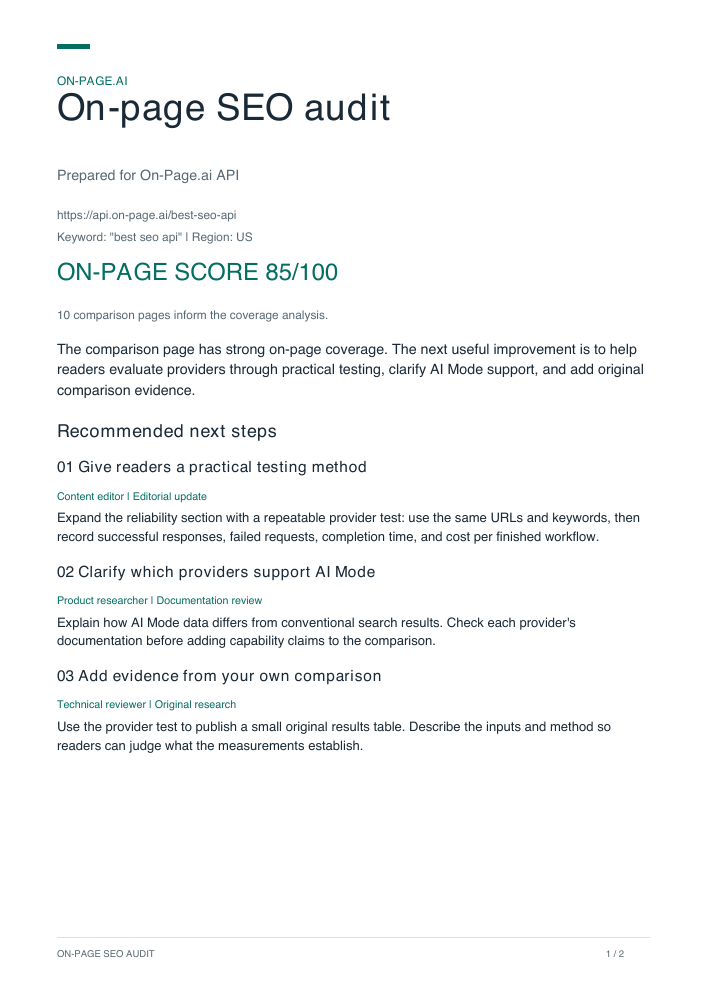
The finished output
A report that explains what to do next
This example audits our SEO API comparison page. It scores 85/100, yet still has useful opportunities to help readers choose a provider.
Page 1: a summary and three recommended actions, with suggested owners and types of work.
Page 2: the evidence supporting those actions, how to verify them, and what the audit covers.
Add this workflow to an agency dashboard, an audit service, or a client portal. Your application controls the branding and the final recommendations.
Download the complete starter ZIP ↓01 / Working example
Start with a PDF you can reproduce
The starter ZIP contains the saved scan, the reviewed recommendations, and complete scan and PDF scripts in both languages. Generate the sample first, then replace the inputs with your own page.
Use Node.js 20+ with pdf-lib. Extract the starter files into a folder, open a terminal there, and run:
npm install pdf-lib
node render-audit.mjs example.json review.json seo-audit.pdf
Open seo-audit.pdf. You should see two pages: three recommended actions, followed by their evidence and verification steps. The saved-response example makes no API calls.
View or download the complete JavaScript / Node.js generator
import { readFileSync, writeFileSync } from "node:fs";
import { PDFDocument, StandardFonts, rgb } from "pdf-lib";

function buildOptimizer(report, { minCoverage = 0.5, ignoredTerms = [] } = {}) {
  if (minCoverage < 0 || minCoverage > 1 || !Number.isFinite(minCoverage)) {
    throw new Error("minCoverage must be between 0 and 1.");
  }
  const entities = report.entity_coverage?.natural_language_entities;
  const matrix = report.competitor_term_coverage;
  if (!Array.isArray(entities) || !Array.isArray(matrix?.domains) || !Array.isArray(matrix?.terms)) {
    throw new Error("Expected entity_coverage and competitor_term_coverage arrays.");
  }
  const key = (text) => String(text).trim().toLowerCase();
  const statuses = new Map(entities.map((row) => [key(row.entity), row.coverage_status]));
  const ignored = new Set(ignoredTerms.map(key));
  const seen = new Set();
  const gaps = [];
  for (const row of matrix.terms) {
    const counts = row.competitor_counts;
    if (!Array.isArray(counts) || counts.length !== matrix.domains.length ||
        counts.some((n) => typeof n !== "number" || !Number.isFinite(n) || n < 0)) {
      throw new Error("Competitor counts must align with domains and contain numbers.");
    }
    const term = key(row.keyword);
    if (!term || seen.has(term)) continue;
    seen.add(term);
    // Require both signals; present_not_entity is already present in the page.
    if (statuses.get(term) !== "missing" || row.your_url_count !== 0 || ignored.has(term)) continue;
    const competitorPages = counts.filter((n) => n > 0).length;
    const comparedPages = counts.length;
    if (!comparedPages || !competitorPages || competitorPages / comparedPages < minCoverage) continue;
    gaps.push({
      id: "coverage:" + term, term: row.keyword,
      importance: Number.isFinite(row.importance) ? row.importance : 0,
      competitorPages, comparedPages,
      prevalence: competitorPages / comparedPages,
      status: "needs_review",
    });
  }
  gaps.sort((a, b) => b.prevalence - a.prevalence || b.importance - a.importance ||
    (a.term < b.term ? -1 : a.term > b.term ? 1 : 0));
  const gain = report.originality?.information_gain;
  const ideas = gain?.potential_uncovered_topics_for_information_gain;
  return {
    jobId: report.jobId,
    targetUrl: report.meta?.url ?? null,
    keyword: report.meta?.target_keyword ?? null,
    region: report.meta?.location ?? null,
    score: report.on_page_optimization?.score ?? null,
    scoreAlgorithm: report.on_page_optimization?.algorithm_version ?? null,
    comparedPages: matrix.domains.length,
    gaps,
    originalIdeas: {
      available: Array.isArray(ideas),
      items: Array.isArray(ideas) ? [...new Set(ideas.filter((s) => typeof s === "string" && s.trim()))] : [],
      uniqueDataPoints: gain?.unique_data_points ?? null,
    },
  };
}

function buildAudit(report, review) {
  const text = (value, name, max = 1200) => {
    if (typeof value !== "string" || !value.trim() || value.length > max) {
      throw new Error(name + " must be nonempty text, at most " + max + " characters.");
    }
    return value.trim();
  };
  const number = (value) => typeof value === "number" && Number.isFinite(value);
  if (!report.jobId || report.jobId !== review.jobId) {
    throw new Error("Review notes must match this report's jobId.");
  }
  const queue = buildOptimizer(report);
  const gaps = new Map(queue.gaps.map((row) => [row.term.trim().toLowerCase(), row]));
  if (!Array.isArray(review.actions) || review.actions.length > 8) {
    throw new Error("Review actions must be an array with at most 8 entries.");
  }
  const used = new Set();
  const actions = review.actions.map((item) => {
    let evidence;
    if (item.kind === "coverage") {
      const term = text(item.term, "term", 120).toLowerCase();
      const gap = gaps.get(term);
      if (!gap) throw new Error("No qualifying missing-term evidence for: " + term);
      if (used.has(term)) throw new Error("Duplicate review term: " + term);
      used.add(term);
      evidence = '"' + gap.term + '" is missing from this page and appears on ' +
        gap.competitorPages + " of " + gap.comparedPages + " compared pages.";
    } else if (item.kind === "research") {
      if (used.has("research")) throw new Error("Duplicate research action.");
      used.add("research");
      const data = queue.originalIdeas.uniqueDataPoints;
      if (!number(data?.your_count) || data.your_count < 0 ||
          !number(data?.page1_average) || data.page1_average < 0) {
        throw new Error("Research action needs unique_data_points evidence.");
      }
      evidence = "The information-gain analysis detected " + data.your_count +
        " unique numeric data points on this page; the comparison-page average is " +
        data.page1_average + ". Review the page before planning new research.";
    } else throw new Error("Unknown action kind.");
    return {
      title: text(item.title, "title", 100),
      action: text(item.action, "action"),
      verify: text(item.verify, "verify", 500),
      owner: text(item.owner, "owner", 80),
      effort: text(item.effort, "effort", 80),
      evidence,
    };
  });
  const score = (value) => number(value) && value >= 0 && value <= 100 ? value : null;
  return {
    jobId: report.jobId,
    brand: text(review.brand, "brand", 80),
    client: text(review.client, "client", 120),
    summary: text(review.summary, "summary"),
    url: text(report.meta?.url, "URL", 2000),
    keyword: text(report.meta?.target_keyword, "keyword", 200),
    region: text(report.meta?.location, "region", 80),
    score: score(report.on_page_optimization?.score),
    originality: score(report.originality?.score),
    comparedPages: queue.comparedPages,
    actions,
  };
}

async function renderAudit(audit) {
  const pdf = await PDFDocument.create({ updateMetadata: false });
  pdf.setTitle("On-page SEO audit | " + audit.client);
  pdf.setAuthor(audit.brand);
  pdf.setSubject("Report reference: " + audit.jobId);
  const regular = await pdf.embedFont(StandardFonts.Helvetica);
  const bold = await pdf.embedFont(StandardFonts.HelveticaBold);
  const ink = rgb(0.10, 0.16, 0.21), muted = rgb(0.35, 0.41, 0.45);
  const accent = rgb(0.02, 0.43, 0.39), line = rgb(0.84, 0.89, 0.88);
  const width = 499, margin = 48;
  let page, y;
  const newPage = () => {
    page = pdf.addPage([595.28, 841.89]);
    page.drawRectangle({ x: margin, y: 801, width: 28, height: 4, color: accent });
    y = 770;
  };
  function wrap(value, font, size) {
    const lines = [];
    let current = "";
    for (const word of String(value).split(/\s+/)) {
      const next = current ? current + " " + word : word;
      if (font.widthOfTextAtSize(next, size) <= width) { current = next; continue; }
      if (current) lines.push(current);
      current = "";
      for (const char of word) {
        if (font.widthOfTextAtSize(current + char, size) > width) {
          lines.push(current); current = "";
        }
        current += char;
      }
    }
    if (current) lines.push(current);
    return lines;
  }
  function text(value, size = 11, font = regular, color = ink, after = 10) {
    let lines;
    try { lines = wrap(value, font, size); }
    catch { throw new Error("This template needs an embedded Unicode font for that text."); }
    for (const value of lines) {
      if (y < 86) newPage();
      page.drawText(value, { x: margin, y, size, font, color });
      y -= size * 1.45;
    }
    y -= after;
  }
  function heading(value) {
    if (y < 175) newPage();
    text(value, 15, bold, ink, 8);
  }
  const score = (value) => value == null ? "Not available" : value + "/100";
  newPage();
  text(audit.brand.toUpperCase(), 10, bold, accent, 15);
  text("On-page SEO audit", 31, bold, ink, 6);
  text("Prepared for " + audit.client, 12, regular, muted, 15);
  text(audit.url, 10, regular, muted, 4);
  text('Keyword: "' + audit.keyword + '"  |  Region: ' + audit.region, 10, regular, muted, 18);
  text("ON-PAGE SCORE   " + score(audit.score), 20, bold, accent, 4);
  text(audit.comparedPages + " comparison pages inform the coverage analysis.", 10, regular, muted, 15);
  text(audit.summary, 12, regular, ink, 18);
  heading("Recommended next steps");
  if (!audit.actions.length) text("No actions were selected for this report. Review the scan before proposing changes.");
  audit.actions.forEach((item, i) => {
    if (y < 170) newPage();
    text(String(i + 1).padStart(2, "0") + "  " + item.title, 13, bold, ink, 4);
    text(item.owner + "  |  " + item.effort, 9, regular, accent, 6);
    text(item.action, 11, regular, ink, 14);
  });
  newPage();
  text("EVIDENCE & FOLLOW-THROUGH", 10, bold, accent, 15);
  text("Why these actions", 27, bold, ink, 8);
  text("Recommendations combine scan evidence with an editorial review of this page.", 11, regular, muted, 20);
  audit.actions.forEach((item, i) => {
    heading(String(i + 1).padStart(2, "0") + "  " + item.title);
    text(item.evidence, 11, regular, ink, 5);
    text("Check: " + item.verify, 10, regular, muted, 18);
  });
  heading("Read the scores in context");
  text("On-page: " + score(audit.score) + ". Originality: " + score(audit.originality) +
    ". These are separate report measures; they are not percentages of SEO work completed or ranking forecasts.", 10, regular, muted, 12);
  heading("Scope and next check");
  text("This report covers one URL, keyword, and region. It is a content and relevance review, not a site-wide technical or backlink audit. Priorities, owners, and actions were selected by the reviewer.", 10, regular, muted, 8);
  text("After publishing the agreed edits, scan the same URL and keyword again. Check whether the topics are now covered. Measure search traffic separately in your analytics.", 10, regular, muted, 8);
  const pages = pdf.getPages();
  pages.forEach((p, i) => {
    p.drawLine({ start: { x: margin, y: 53 }, end: { x: margin + width, y: 53 }, thickness: 0.7, color: line });
    p.drawText("ON-PAGE SEO AUDIT", { x: margin, y: 36, size: 8, font: regular, color: muted });
    p.drawText((i + 1) + " / " + pages.length, { x: 510, y: 36, size: 8, font: regular, color: muted });
  });
  return pdf.save();
}

const [reportPath, reviewPath, outputPath = "seo-audit.pdf"] = process.argv.slice(2);
if (!reportPath || !reviewPath) throw new Error("Usage: node render-audit.mjs report.json review.json [output.pdf]");
const report = JSON.parse(readFileSync(reportPath, "utf8"));
const review = JSON.parse(readFileSync(reviewPath, "utf8"));
const audit = buildAudit(report, review);
const bytes = await renderAudit(audit);
writeFileSync(outputPath, bytes);
console.log("Saved " + outputPath);The API returns JSON. Your application builds the PDF using pdf-lib in JavaScript or ReportLab in Python. Both examples use the same selection rules and report content; font spacing and pagination can differ between renderers.
02 / Your own page
Retrieve the report once
Use a publicly crawlable URL, its target keyword, and a Google region. This example uses a Standard scan because it includes both coverage and originality. Keep your API key on the server.
Use Bash or zsh with cURL 7.76+ and OpenSSL. The same REST calls work from PHP, Go, Java, C#, or another HTTP client.
export ONPAGE_API_KEY="your-api-key"
# Generate once for this scan; keep the same key when retrying.
export ONPAGE_IDEMPOTENCY_KEY="$(openssl rand -hex 16)"curl --include --fail-with-body --silent --show-error --max-time 30 \
-X POST "https://api.on-page.ai/v1/scan" \
-H "Authorization: Bearer $ONPAGE_API_KEY" \
-H "Content-Type: application/json" \
-H "Idempotency-Key: $ONPAGE_IDEMPOTENCY_KEY" \
--data '{
"url": "https://api.on-page.ai/best-seo-api",
"keyword": "best seo api",
"region": "US"
}'Copy job_id from the response into ONPAGE_JOB_ID below.
export ONPAGE_JOB_ID="job_id_from_the_scan_response"

curl --include --fail-with-body --silent --show-error --max-time 30 \
  "https://api.on-page.ai/v1/jobs/$ONPAGE_JOB_ID" \
  -H "Authorization: Bearer $ONPAGE_API_KEY"
Repeat the GET every few seconds until status is completed. Stop on failed or cancelled. Retrieve the completed JSON separately:
curl --fail-with-body --silent --show-error --max-time 30 \
  "https://api.on-page.ai/v1/jobs/$ONPAGE_JOB_ID/result?response_format=customer_v1" \
  -H "Authorization: Bearer $ONPAGE_API_KEY" \
  --output report.json
cURL retrieves the data. Use either PDF generator above to render the file after completing the review step.
Save the JSON with the job ID. You can revise the summary, change branding, and regenerate the PDF from that saved result without submitting another scan. Fetching job status and results does not start a new analysis.
The scripts wait up to approximately five minutes, handle numeric Retry-After values on 429/503 responses, and print an ID you can resume. A longer-running job can finish after the script stops waiting.
03 / Findings to recommendations
Select the work worth putting in front of a client
An audit becomes useful when it connects a finding to a decision. Here, “testing” is an opportunity to teach readers how to evaluate providers. The action is to explain a repeatable comparison method; adding the word by itself would accomplish little.
| Scan evidence | Decision for this report |
|---|---|
| testing Missing; present on 7 of 10 comparison pages. | Include a practical provider-testing method in the reliability section. |
| ai mode Missing; present on 7 of 10 comparison pages. | Research provider support, then clarify it in the comparison. |
| integration Already present in the source page. | Exclude from missing-topic recommendations. |
| company Missing; present on 6 of 10 comparison pages. | Exclude. The generic term does not identify a useful change for this reader. |
The generator qualifies a coverage finding only when the natural-language entity is missing, the page’s term count is zero, and at least half of the compared pages contain it. Those are application rules, not API priority labels. See the content optimizer tutorial for the full selection logic.
Keep the recommendation editable
review.json supplies the client name, your brand, a summary, and the actions in the order you want to present them. Here is the first action from the example:
{
  "jobId": "job_8402f226-0f49-452e-8381-f7c11fe4f94c",
  "brand": "On-Page.ai",
  "client": "On-Page.ai API",
  "summary": "The comparison page has strong on-page coverage. The next useful improvement is to help readers evaluate providers through practical testing, clarify AI Mode support, and add original comparison evidence.",
  "actions": [
    {
      "kind": "coverage",
      "term": "testing",
      "title": "Give readers a practical testing method",
      "action": "Expand the reliability section with a repeatable provider test: use the same URLs and keywords, then record successful responses, failed requests, completion time, and cost per finished workflow.",
      "verify": "A reader can reproduce the comparison. Any published measurements come from completed tests.",
      "owner": "Content editor",
      "effort": "Editorial update"
    }
  ]
}
For your own report, replace the job ID and rewrite the summary and actions after reviewing the new scan and source page. The full example review file includes all three actions. An empty actions array produces an explicit “No actions were selected” message.
kind: "coverage"- Looks up
termin the validated missing-topic queue. The generator writes the numerical evidence from the API response. kind: "research"- Uses the report’s detected unique data points and comparison average. The example suggests publishing results from a real provider test.
action/verify- Describe the change and what completion looks like. Owners, effort descriptions, wording, and order come from your review.
Handle unavailable findings honestly
The sample’s originality section reports zero detected unique numeric data points and a comparison average of 11.1. That supports reviewing the opportunity for original research; it does not establish that the page contains no original ideas.
The uncovered-topic question list is empty, so this report invents no questions. If originality is absent, its score reads “Not available.” A research action without its supporting data stops generation with a clear error. Remove that action or obtain a report containing the evidence.
04 / The export feature
Generate, inspect, and deliver
After the review is complete, render your saved report and notes:
node render-audit.mjs report.json review.json client-audit.pdfOpen the PDF and check the client, target URL, keyword, region, recommendations, and page breaks. The generator validates evidence and the matching job ID; your review establishes whether the proposed changes make sense for the client.
Fit it into your application
- Store the inputs together. Keep the scan JSON, job ID, client account, review revision, and template version as one export record.
- Render in a worker. Call
buildAuditandrenderAuditin Node.js, orbuild_auditandrender_auditin Python. The renderers return PDF bytes. - Expose the download. Save those bytes to private storage or return them from your authenticated endpoint with
Content-Type: application/pdfand a download filename. - Retry rendering from storage. A failed export should use the saved inputs again. Only request a new scan when you need fresh page analysis.
For a client portal, check that the current user can access the export’s account before serving the PDF. Use a separate output path per export; the tutorial CLI overwrites the filename you give it.
After the agreed changes are published, run a new scan with the same URL, keyword, and region. The before-and-after comparison helper shows how to check coverage changes without confusing an omitted term with a resolved issue.
05 / Developer questions
Details that matter when you ship it
Does the API return a PDF? Do I need a browser or an LLM?
The API returns the analysis as JSON. The supplied libraries create PDF bytes directly, so these scripts do not launch a browser or call an LLM. Python uses pypdf to set the final document metadata.
You can add an LLM to draft the review input. Keep its draft editable, validate it against the same evidence, and review the result before delivery. Any LLM charges would be separate from the scan.
What does it cost, and can I use Lite or Deep?
The example uses one Standard scan at 2 credits. Lite costs 1.5 credits and can support a coverage-only report, but omits originality; remove the research action. Deep costs 3 credits and can supply the fields used here. Use the appropriate endpoint and response format from the API reference.
Generating PDFs from saved JSON uses local compute and no additional scan credits. Rescanning an updated page is a new paid scan. See pricing for plans.
Why does it reject my review file?
review.jobId must equal the report’s jobId. A coverage term must meet the missing-topic rule, and a research action needs numeric information-gain evidence. Duplicate actions, unknown kinds, or missing required review text are rejected.
Correct the notes for the actual scan. Changing the job ID alone does not make the old recommendations relevant to a new page.
What if there are fewer competitors or no recommendations?
The prevalence calculation uses the number of domains actually returned. Three of five compared pages means 3/5. Missing core entity or comparison arrays stop generation because the evidence cannot be validated.
An empty reviewed action list is valid and is shown explicitly. Missing scores remain unavailable; a real score of zero stays zero. Never describe an unavailable section as a passed check.
Can I change the branding, fonts, and report length?
Set brand and client in the review file. Edit the accent color and layout in the renderer. The sample is two A4 pages; longer text flows to more pages. This starter accepts up to eight reviewed actions to keep the report focused.
The built-in Helvetica fonts suit English and common Western European text. Unsupported characters stop the export. For other writing systems, embed a font with the required characters and test text shaping, line wrapping, and right-to-left layout. Use pdf-lib’s custom font support or ReportLab’s font registration.
How do I run this for many clients?
Separate scan jobs from export jobs. Queue scans within your account’s rate limits, persist job IDs, and resume them after interruptions. A verified completion webhook can replace polling in a production worker.
Scope saved reports and exports to the client account. Cache an export by its scan, review revision, and template version, so changing the summary regenerates the PDF without buying another scan.
Is this a full technical audit or a ranking guarantee?
This template is a single-page content and relevance audit. It does not include a site crawl, backlink analysis, or analytics data. On-page and originality scores are separate measures; neither predicts a specific ranking or traffic increase.
Extend the report with additional verified data when your service includes those areas, and label the scope clearly for the client.
Make the analysis part of your product
You now have the pieces for an audit export: a resumable scan workflow, reviewable recommendations, and a PDF generator in either language. On-Page.ai supplies the comparison evidence; your application turns it into a report that reflects the client’s priorities.
Start with the sample, adapt the review step to your dashboard, and use the content optimizer workflow to help clients implement the recommendations and evaluate the next scan.